
Making Undeletable Folder
1]- Open CMD ( Type in Run option, the command ‘cmd’ or navigate to All Programs->Accessories-> Command Prompt)

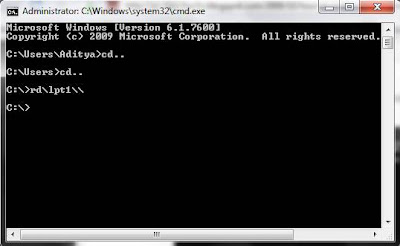
2]- Change the directory to where you want to create the folder.Type ‘cd..’ to exit the current directory. As an example i will be creating the folder in C:, so i will use the ‘cd..’ command
twice to navigate to C:
3]- Type md\lpt1\\ and press enter, the folder now will be in your C:

4]- If you try to delete it, it wont delete. This works on all version of windows.
5]- If you want to delete it just go to ‘CMD’, navigate to the directory and typerd\lpt1\\ and press Enter.

 Read More
Add your Comment
1 comments
Read More
Add your Comment
1 comments


Subscribe To


 Posts
All Comments
Posts
All Comments


